The short answer
Four checks answer it, and a UK partner can run all four inside the firm's own Google Ads and Google Analytics accounts without technical help. Read what the conversion action counts. Read the change history for who changed it and when. Reproduce the figure on the dates the report covers. Then set the enquiries against the practice's own records. A report that survives those four is evidence.
Key takeaways
- Comparing the report with the dashboard is not verification. Both read the same configuration, and whoever holds the account can change it.
- Google Ads counts either one conversion per ad click or every conversion that follows it, and the two settings produce different totals from identical activity.
- A change to that setting applies to future reporting only, so a trend line can run straight through a change of definition.
- Google Ads and Google Analytics each keep two years of change history naming the user who made each change.
- No platform knows whether an enquiry became fee income. That column belongs to the practice, and it is the one the partners are asking about.
The advice a UK managing partner will find on this question is to compare the agency's report against the platform it came from. That check does not do what it appears to do. The figure in the report and the figure in the dashboard are one figure read twice, because both are produced by the same configuration, and that configuration belongs to whoever holds the account.
What can be verified is the configuration itself, and both platforms publish what their settings do and keep a dated record of who changed them. Google Ads and Google Analytics each hold two years of change history naming the user responsible for each change. Neither record is produced by the agency, which is why it is worth more than the report. One figure on the page cannot be checked in any account at all, and that is the one the partners actually care about.
Comparing the report with the dashboard is not a check
A screenshot and a live view of the same account agree with each other by construction. Both are readings of one set of definitions. Agreement between them shows the figure was copied accurately. It says nothing about what the figure is, and nothing about whether it means the same thing as the figure beside it from three months ago.
Step 01
Can you open the account yourself?
The firm's own login, not a screen share and not a login belonging to the agency. Everything below depends on it, and it is the only rung settled before the engagement starts. Ten minutes, once.
Step 02
What is the headline column counting?
In Google Ads, open the conversion action behind the figure and read two settings: whether it counts one conversion per click or every conversion, and whether it is a primary action reported in the Conversions column at all. Fifteen minutes.
Step 03
Who changed it, and when?
Change history in both accounts, filtered to the months the report compares. It names the user and the item changed, and it goes back two years. Ten minutes.
Step 04
Does the figure reproduce on the same dates?
Set the date range the report covers, read the same column, and write down the date you read it. Fifteen minutes.
Step 05
Did any of it become fee income?
Open. Nothing in an advertising or analytics account can answer this, and the agency cannot supply it either. It comes from the practice's own enquiry records.
What the headline column was set to count
Google Ads counts either one conversion per ad click or every conversion that follows it, and the choice is made on each conversion action. Google documents both in its conversion counting options, with the default differing by the type of conversion action. A second setting decides whether the action reaches the headline figure at all: Google's documentation on primary and secondary conversion actions puts primary actions in the Conversions column and leaves secondary ones in All conversions, where a partner reading the report never meets them.
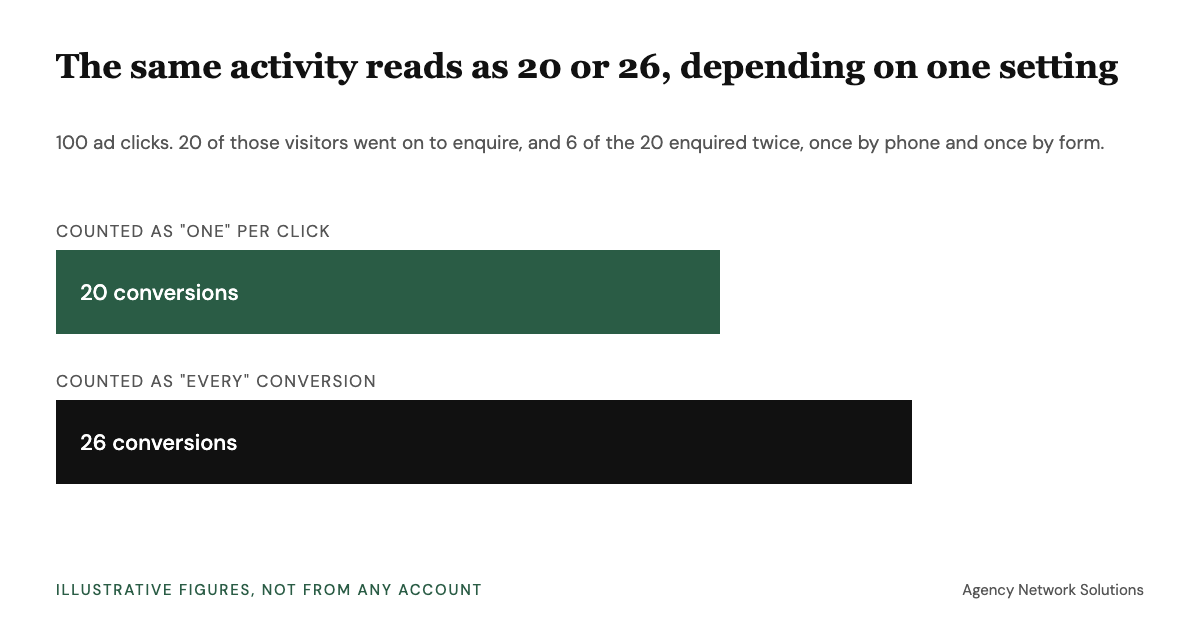
A worked example shows the size of it. Take 100 ad clicks, 20 of which lead to an enquiry, with 6 of those 20 visitors enquiring twice, once by phone and once through the form. Counted as one per click, the report says 20. Counted as every conversion, the same month says 26. Neither number is wrong and neither is a lie. They answer different questions, and a report that does not say which one it answers cannot be compared with last quarter or with another supplier.
Conversion counting options
Every conversion counts every conversion after an ad interaction. One conversion counts only one per ad click.
Two accounts running identical campaigns can report different totals.
Conversion counting options
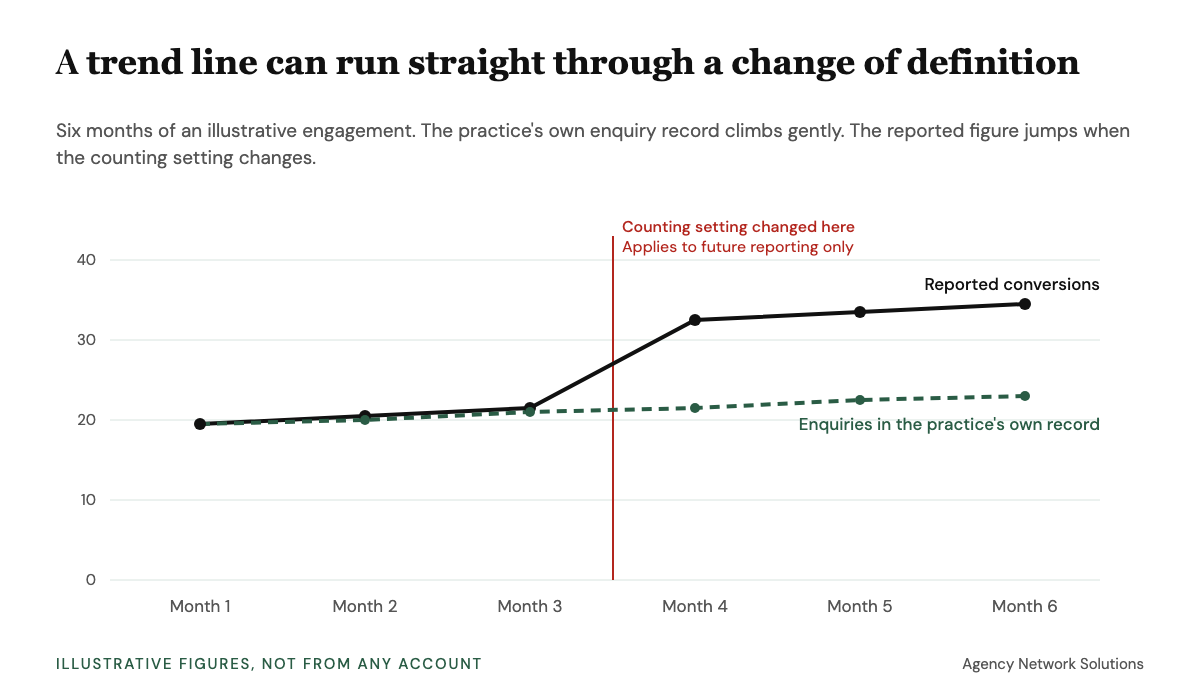
A change to a counting setting applies to future conversion reporting only.
The months either side of such a change were counted differently, and a chart will draw a straight line through it.
Primary and secondary actions
Primary actions are reported in the Conversions column. Secondary actions are reported in All conversions and not in Conversions.
A real conversion marked secondary never appears in the headline figure. Nothing is concealed, and nothing announces it either.
Analytics change history
Change history records the date and time, the item, the change made and which Analytics user made it, for the last two years. Viewing it requires the Editor role.
The record exists whether or not the report mentions it, and the Editor requirement makes this an access question first.
The record the agency does not write
Both platforms keep two years of change history, and both name the user behind each change. Google Ads lets a firm review the account history and filter it by date and by user. Google Analytics records the same for an account or property: the date and time, the item, the change and the user, with the Editor role needed to read it.
Change history answers the question a review meeting cannot: whether the definition behind a rising number held still while the number rose. It is the only independent record in the engagement.
Here is why the date matters. Suppose the counting setting is switched from one per click to every conversion in month four. Nothing about the firm's marketing has changed, yet the reported line jumps, and the next three months look like growth. The practice's own enquiry record, which has no setting to switch, keeps its gentle slope. The gap between the two lines is the definition, and change history is where it shows.
If change history shows a change the report never mentioned, the useful response is a question and not an accusation. Ask what was changed and why, who approved it, whether earlier months can be restated on the same definition, and whether the target the agency is held to was reset at the same time. A good supplier answers all four in writing within a day. A defensive or vague answer tells a partner something too, and it is cheaper to learn it at month three than at renewal.
Before the next review meeting
Not sure the figures you are shown could be opened and read?
Free to your firm. The agency pays us, and only if the relationship works, which is why we would rather ask a supplier how its numbers are produced than place one that has never been asked.
Get a recommendationThe evidence standard your own practice already applies
A UK audit does not accept a figure because somebody reported it. ISA (UK) 500, the Financial Reporting Council's standard on audit evidence, measures evidence by its appropriateness, meaning its relevance and its reliability, and among its reliability considerations is that evidence obtained directly is more reliable than evidence obtained indirectly or by inference.
The standard governs auditors conducting an audit. It is no duty on a marketing supplier, and no agency is in breach of it. It is useful here because a practice that would refuse a client's screenshot of a bank balance will accept a screenshot of a conversion count.
The column no platform can give you
No advertising or analytics account knows whether an enquiry became a client. That sits in the practice management system, which makes the outcome column the firm's to supply. A dated export of enquiry dates and what each one became closes the gap without naming a client, and it settles the attribution argument before anybody has it.
It also decides which checks matter, because the two channels a practice usually chooses between produce different evidence: paid search has a conversion column to interrogate, and search visibility has query and position data that no conversion setting touches.
Put the three together and the practice ends up holding a short file: a note of what each headline figure counts, the dated change history, and its own enquiry export. Few suppliers are ever asked for it, which is the reason for asking early. Written down at month three, it turns a vague unease at renewal into a comparison with something to compare against.
When to check less, and when not to hire at all
Running this every month is the wrong frequency.
Done properly once, at around month three, it establishes what each figure counts and who has been changing it. After that it is a renewal exercise, plus a look at change history whenever a number moves sharply.
There is also a case for appointing nobody yet. Where no one at a UK firm holds the accounts, or no one can say what an enquiry is worth to the practice, no amount of checking will settle whether the money worked. That is worth the partner time an engagement needs anyway before a supplier is appointed rather than after.
Saying so costs us the introduction fee, because we are paid by the agency and only when a relationship works. What we examine before recommending anybody is set out for accountancy practices, recruitment agencies, tax advisory and financial advice firms.
Frequently asked questions
What partners ask before the review meeting.
How do you check an agency's reported numbers are real?
Open the conversion action in the firm's own Google Ads account and read what it was set to count. Open the change history in Google Ads and Google Analytics and read who changed it and when. Reproduce the figure on the dates the report covers. Then set the enquiries against the practice's own records.
Can we check the numbers without asking the agency?
Yes, where the UK firm holds its own access to the advertising and analytics accounts rather than using the agency's login. One exception: viewing change history in Google Analytics requires the Editor role, so a view-only user has to be upgraded first.
The report and the dashboard agree. Does that prove the figure?
No. Both read the same configuration, so agreement only shows the report was copied accurately. What the figure counts, and whether that definition changed inside the period, are separate questions the match does not answer.
How far back can we see what was changed in the accounts?
Google Ads and Google Analytics each keep change history for the last two years, and both record which user made each change. That is longer than most agency engagements, and the agency does not write it.
Our agency reports through its own dashboard tool. Does that change anything?
Not materially. A reporting tool reads the same accounts through the platform's own interface, so the questions do not change: which account and column the figure came from, and what that column was set to count. Ask, then check it in the account.
Sources and useful reading
- Financial Reporting Council, ISA (UK) 500, Audit Evidence, for appropriateness being the relevance and reliability of evidence, and for evidence obtained directly being more reliable than evidence obtained indirectly or by inference.
- Google Ads Help, about conversion counting options, for the one and every settings and their differing defaults. A change to the setting applies to future reporting only.
- Google Ads Help, about primary and secondary conversion actions, for primary actions being reported in the Conversions column and secondary actions in All conversions.
- Google Ads Help, review your account history, for two years of change history and for filtering by date and by user.
- Google Analytics Help, view the history of account and property changes, for what the record holds and the two year window, with the Editor role required to read it.
This article is commercial decision support and is not legal advice. The auditing standard cited applies to auditors conducting an audit and is no duty on any supplier or firm. Each platform behaviour is documented by the platform that operates it and is changed without notice, so read the current page. All sources were located on 6 October 2026. Nothing here describes any named agency or engagement.